Advanced R for Econometricians
Web Scraping with rvest
Martin C. Arnold, Jens Klenke
What is Web Scraping?
Web scraping is the process of extracting data from websites. It can be used if the desired data are not readily available via e.g. a download link or an API.
What is Web Scraping?
Web scraping is the process of extracting data from websites. It can be used if the desired data are not readily available via e.g. a download link or an API.
Example
Consider the website https://www.trustpilot.com/ which is a platform for customer reviews.
What is Web Scraping?
Web scraping is the process of extracting data from websites. It can be used if the desired data are not readily available via e.g. a download link or an API.
Example
Consider the website https://www.trustpilot.com/ which is a platform for customer reviews.
Each review consists of different parts such as
- a short text
- a date
- a rating from 1 to 5 stars.
What is Web Scraping?
Web scraping is the process of extracting data from websites. It can be used if the desired data are not readily available via e.g. a download link or an API.
Example
Consider the website https://www.trustpilot.com/ which is a platform for customer reviews.
Each review consists of different parts such as
- a short text
- a date
- a rating from 1 to 5 stars.
Let's say we are interested whether the ratings of a shop change over time. For this we would need to gather the date and the star rating which are, however, not downloadable.
We will learn how we can access these data nonetheless to perform the analysis.
Legal Issues
Web scraping is generally legal. However, depending on the jurisdiction it can be considered illegal in some cases.
Legal Issues
Web scraping is generally legal. However, depending on the jurisdiction it can be considered illegal in some cases.
You should be careful if...
- you have to sign in into e.g. a social network since you agree to their rules
- you circumvent web security measures
- you scrape personal information such as email addresses, etc.
- you scrape a substantial amount of a website's content
- you want to republish the scraped content, e.g. an article from a newspage.
- web scraping is prohibited by the Terms of Service, even if this doesn't make it illegal per se.
Legal Issues
Web scraping is generally legal. However, depending on the jurisdiction it can be considered illegal in some cases.
You should be careful if...
- you have to sign in into e.g. a social network since you agree to their rules
- you circumvent web security measures
- you scrape personal information such as email addresses, etc.
- you scrape a substantial amount of a website's content
- you want to republish the scraped content, e.g. an article from a newspage.
- web scraping is prohibited by the Terms of Service, even if this doesn't make it illegal per se.
Important: avoid troubles by limiting the number of requests to a reasonable amount (e.g. 1 request every 10 seconds). Otherwise it could be considered as a denial of service attack.
The Structure of a Website
To extract data from a website it is necessary to understand the basics of how a website is built.
The Structure of a Website
To extract data from a website it is necessary to understand the basics of how a website is built.
Basic HTML example:
<!DOCTYPE html> <html> <head> <title>Page Title</title> </head> <body> <h1>This is a Heading</h1> <p>This is a paragraph.</p> <div> <h1>This is another Heading</h1> <p>This is another paragraph.</p> </div> </body> </html>The Structure of a Website
To extract data from a website it is necessary to understand the basics of how a website is built.
Basic HTML example:
<!DOCTYPE html> <html> <head> <title>Page Title</title> </head> <body> <h1>This is a Heading</h1> <p>This is a paragraph.</p> <div> <h1>This is another Heading</h1> <p>This is another paragraph.</p> </div> </body> </html>- The
<html>...</html>tags are the container for all other HTML elements. - The
<head>...</head>tags contain meta data which are not directly visible on the web page. <body>...</body>contains everything we can see such as text, links, images, tables, lists, etc. This is the most relevant part for web scraping.
The Body
Exmaple
<body> <h1>This is a Heading</h1> <p>This is a paragraph.</p> <div> <h1>This is another Heading</h1> <p>This is another paragraph.</p> </div> </body>The Body
Exmaple
<body> <h1>This is a Heading</h1> <p>This is a paragraph.</p> <div> <h1>This is another Heading</h1> <p>This is another paragraph.</p> </div> </body>In the body part tags are used to give the displayed information a structure. In our example we use:
<h1>...</h1>to define a heading<p>...</p>to define text<div>...</div>to define different sections.
Look at the w3schools tag list for other tags you might encounter.
The Body
Exmaple
<body> <h1>This is a Heading</h1> <p>This is a paragraph.</p> <div> <h1>This is another Heading</h1> <p>This is another paragraph.</p> </div> </body>In the body part tags are used to give the displayed information a structure. In our example we use:
<h1>...</h1>to define a heading<p>...</p>to define text<div>...</div>to define different sections.
Look at the w3schools tag list for other tags you might encounter.
We will start by scraping the simple HTML page from before. Create a new HTML document and copy the code from the last slide into it.
read_html()
The package rvest makes use of the structure of an HTML document to extract the relevant information.
The first step is to load the website into R using xml2::read_html() (rvest depends on xml2 whereby xml2 automatically loads when rvest gets loaded).
read_html()
The package rvest makes use of the structure of an HTML document to extract the relevant information.
The first step is to load the website into R using xml2::read_html() (rvest depends on xml2 whereby xml2 automatically loads when rvest gets loaded).
Exmaple
library(rvest)URL <- here::here("SoSe_2022/webscraping/examples/simple_html_page.html") # path of my html file(page <- read_html(URL))## {html_document}## <html>## [1] <head>\n<meta http-equiv="Content-Type" content="text/html; charset=UTF-8 ...## [2] <body>\n \n <h1>This is a Heading</h1>\n <p>This is a paragraph.</p>\n ...XML Structure
Our page is now stored as an xml document which has a hierarchical data structure. For our page it looks like this.
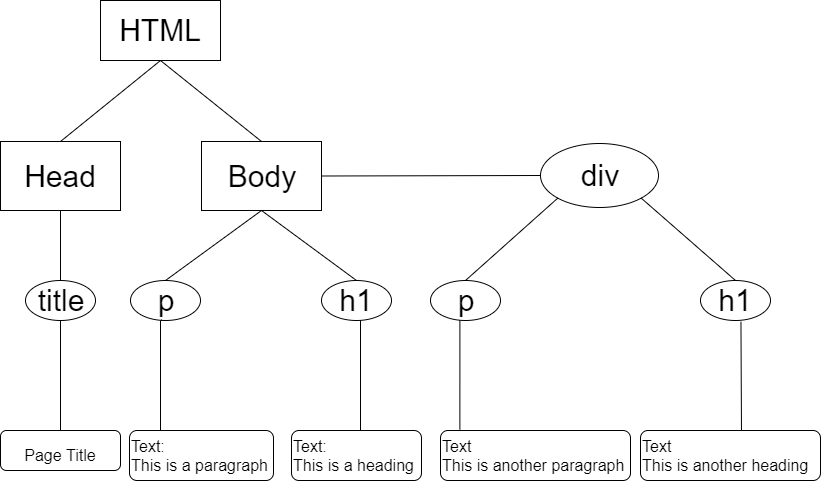
XML Structure
Our page is now stored as an xml document which has a hierarchical data structure. For our page it looks like this.
- We call everything surrounded by a rectangle or a circle a node.
- We call everything surrounded by a rectangle with rounded corners data.
html_node()
We can navigate through the xml object using rvest::html_node().
- Get all
pnodepage %>% rvest::html_nodes("p")## {xml_nodeset (2)}## [1] <p>This is a paragraph.</p>## [2] <p>This is another paragraph.</p>
html_node()
We can navigate through the xml object using rvest::html_node().
Get all
pnodepage %>% rvest::html_nodes("p")## {xml_nodeset (2)}## [1] <p>This is a paragraph.</p>## [2] <p>This is another paragraph.</p>Get only
pnodes which are children ofdivnodespage %>%rvest::html_nodes("div") %>%rvest::html_nodes("p")## {xml_nodeset (1)}## [1] <p>This is another paragraph.</p>
html_text()
If we got the nodes which contain the data we want to scrape, we can use rvest::html_text() to
extract the data (i.e. the text between the tags) as a normal character vector.
html_text()
If we got the nodes which contain the data we want to scrape, we can use rvest::html_text() to
extract the data (i.e. the text between the tags) as a normal character vector.
page %>% html_nodes("div") %>% html_nodes("p") %>% html_text()## [1] "This is another paragraph."CSS
Websites are not only built with HTML. CSS is the language which is used to style a website. Let's add a bit more to our simple page:
- add a link to a
cssfile (which doesn't exist now) in the head section of your html file<link rel="stylesheet" href="stylesheet.css">
CSS
Websites are not only built with HTML. CSS is the language which is used to style a website. Let's add a bit more to our simple page:
- add a link to a
cssfile (which doesn't exist now) in the head section of your html file<link rel="stylesheet" href="stylesheet.css">
add another
divwith a heading and a paragraphcreate a new file
stylesheet.cssin the same folder as your HTML filecopy the following code into that file and see what happens
CSS
Websites are not only built with HTML. CSS is the language which is used to style a website. Let's add a bit more to our simple page:
- add a link to a
cssfile (which doesn't exist now) in the head section of your html file<link rel="stylesheet" href="stylesheet.css">
add another
divwith a heading and a paragraphcreate a new file
stylesheet.cssin the same folder as your HTML filecopy the following code into that file and see what happens
div h1 { color: green; text-align: center;};CSS Selectors
What if we want different div sections to look differently?
For this classes and ids can be specified. For web scraping we usually only need to know about classes, but ids work quite similar.
CSS Selectors
What if we want different div sections to look differently?
For this classes and ids can be specified. For web scraping we usually only need to know about classes, but ids work quite similar.
- change the code of one
divsection to<div class = "blue"> ... </div> - and the other to <div class = "red"> ... </div>
CSS Selectors
Having added a class attribute to our div sections, we can now use this class in the CSS file as follows
CSS Selectors
Having added a class attribute to our div sections, we can now use this class in the CSS file as follows
.blue h1 { color: blue; text-align: center;}.red h1 { color: green; text-align: center;}- What is before the
{}is called a CSS selector.- It can consist of classes, ids, tags and of any combination of those elements.
- E.g.
.blue h1reads as: select allh1headings inside an element with classblue. - Note: you need to put a
.before the class name.
CSS Selectors
Having added a class attribute to our div sections, we can now use this class in the CSS file as follows
.blue h1 { color: blue; text-align: center;}.red h1 { color: green; text-align: center;}- What is before the
{}is called a CSS selector.- It can consist of classes, ids, tags and of any combination of those elements.
- E.g.
.blue h1reads as: select allh1headings inside an element with classblue. - Note: you need to put a
.before the class name.
For more on selectors look at w3chools CSS Selector Reference.
CSS Selectors
Having added a class attribute to our div sections, we can now use this class in the CSS file as follows
.blue h1 { color: blue; text-align: center;}.red h1 { color: green; text-align: center;}- What is before the
{}is called a CSS selector.- It can consist of classes, ids, tags and of any combination of those elements.
- E.g.
.blue h1reads as: select allh1headings inside an element with classblue. - Note: you need to put a
.before the class name.
For more on selectors look at w3chools CSS Selector Reference.
The web developer uses selectors to style similar content in the same way (e.g. on trustpilot.com each user review looks the same). We can use those to scrape the content we desire more specifically.
Use the Selectors
Let's say we want to select all paragraphs (p) which are a descend of an element with class .red. We can achieve this with
Use the Selectors
Let's say we want to select all paragraphs (p) which are a descend of an element with class .red. We can achieve this with
Exmaple
url <- here::here("SoSe_2022/webscraping/examples/simple_html_page_with_css.html")page <- url %>% read_html()page %>% html_nodes(".red") %>% html_nodes("p") %>% html_text()## [1] "But this isn't red."Use the Selectors
Let's say we want to select all paragraphs (p) which are a descend of an element with class .red. We can achieve this with
Exmaple
url <- here::here("SoSe_2022/webscraping/examples/simple_html_page_with_css.html")page <- url %>% read_html()page %>% html_nodes(".red") %>% html_nodes("p") %>% html_text()## [1] "But this isn't red."or in short
Exmaple
page %>% html_nodes(".red p") %>% html_text()## [1] "But this isn't red."Extract attributes
Sometimes we are not interested in the text between element tags but the relevant information is hidden in the tag attributes.
Attributes are everything that is defined in the opening tag, e.g in
Extract attributes
Sometimes we are not interested in the text between element tags but the relevant information is hidden in the tag attributes.
Attributes are everything that is defined in the opening tag, e.g in
Exmaple
<div class = "blue"> ... </div>Extract attributes
Sometimes we are not interested in the text between element tags but the relevant information is hidden in the tag attributes.
Attributes are everything that is defined in the opening tag, e.g in
Exmaple
<div class = "blue"> ... </div>class = "blue"is an attribute.
With html_attrs() and html_attr() we can extract these information.
Extract attributes
Sometimes we are not interested in the text between element tags but the relevant information is hidden in the tag attributes.
Attributes are everything that is defined in the opening tag, e.g in
Exmaple
<div class = "blue"> ... </div>class = "blue"is an attribute.
With html_attrs() and html_attr() we can extract these information.
Exmaple
# Get all attributespage %>% html_nodes(".red") %>% html_attrs()## [[1]]## class ## "red"# Get a specific attributepage %>% html_nodes(".red") %>% html_attr("class")## [1] "red"HTML tables
Since data are often stored in tables, rvest provides the function html_table() which parses a HTML table into a data frame. Tables in HTML look like this:
HTML tables
Since data are often stored in tables, rvest provides the function html_table() which parses a HTML table into a data frame. Tables in HTML look like this:
Exmaple
<table style="width:100%"> <tr> <th>Firstname</th> <th>Lastname</th> <th>Age</th> </tr> <tr> <td>Jill</td> <td>Smith</td> <td>50</td> </tr> <tr> <td>Eve</td> <td>Jackson</td> <td>94</td> </tr></table>HTML tables
Since data are often stored in tables, rvest provides the function html_table() which parses a HTML table into a data frame. Tables in HTML look like this:
Exmaple
<table style="width:100%"> <tr> <th>Firstname</th> <th>Lastname</th> <th>Age</th> </tr> <tr> <td>Jill</td> <td>Smith</td> <td>50</td> </tr> <tr> <td>Eve</td> <td>Jackson</td> <td>94</td> </tr></table>
Exercise:
- Add this table to your HTML file.
- Try to scrape the data using
html_table()
CSS Selector Gadget
How do we find the CSS selectors
Looking into the source code (depending on your web browser you can right click on the webpage and click e.g. source code, inspect, ...)
Digging through the source code is often not necessary. If you use Chrome install the Selector Gadget.
A real example: trustpilot.com
We want to write a function that for each review extracts
- the name of the reviewer
- the number of stars
- the date
- the review title
- the review text
A real example: trustpilot.com
We want to write a function that for each review extracts
- the name of the reviewer
- the number of stars
- the date
- the review title
- the review text
The final function to extract data from one URL might look like this:
Exmaple
get_reviews <- function(url){ page <- read_html(url) tibble( name = get_name(page), rating = get_rating(page), date = get_date(page), title = get_title(page), text = get_text(page) )}Exercise:
A real example: trustpilot.com
Not only do we want to scrape all reviews from one URL but all reviews for a company which are distributed over many URLs. Can you write a function which can do this?